Drive blog traffic via X/Twitter: 12 essential formulas
Ejaz Ahmed
29 Dec 2025 | 6 min read

You have to promote your blog if you want it to really take off. X/Twitter draws in over 500 million users.
That makes it a solid spot for cross-promoting your content. Still, just dropping the title and a link in a tweet does not get the job done. Get proactive and creative with your approach. Lean into some strong marketing tactics too. Put these 12 tweet formulas to use. They will help drive more traffic right to your blog.
1. Employ brief, intriguing tweets
It's pretty tough to craft engaging tweets that fit under defined characters. When you tweet a link to a blog post, stick with short and creative ones that spark some interest. You do not need to include the title of that post.
For example, Mashable generated disbelief and interest in a few words.

Try writing five variations of a tweet (10 words or less) for a post you wrote to see what performs best.
2. Use an intriguing quote from the post
Pick out a short, captivating quote from your latest blog entry. That way, you give your followers just a glimpse of what's inside. Posts like that on X/Twitter tend to perform really well. Research backs it up with a 54 percent boost in retweet odds.
This often translates to more visitors heading over to your site.
3. Incorporate statistics
Use statistics from your article in a tweet, as people love data. Incorporate numbers and characters, not just letters, to make the tweet stand out in followers' timelines, like Hubspot's example which used a short "did you know" question with figures and a link.
4. Utilize hashtags
Hashtags (words or phrases preceded by a #) connect your tweets to various topics, extending your reach beyond your followers.
There are two main methods to use hashtags for driving blog traffic:
- Use theme-specific hashtags: Create a unique hashtag to promote a specific blog, contest or your entire blog (e.g., #myawesomeblog). This creates a central conversation point, increasing interest and traffic.
- Use general post-related hashtags: Include hashtags relevant to your blog post's topics (e.g., #thunderstorm, #supercell). This ensures your tweet is seen by other Twitter users searching for those subjects, broadening your audience.
5. Leverage @mentions
Use @mentions (Twitter usernames) in tweets linking to your blog post to drive traffic.
- Mention prominent figures: If your post discusses influential bloggers, companies or customers, mention them. They may retweet it to their followers.
- Thank commenters: Mention readers who left good comments as a way to show appreciation.
- Credit authors: Mention the post's author (guest or regular). This nice gesture often leads to a retweet to their audience.
6. Mention blog content and retweet
If someone mentions your blog content on Twitter, retweet their tweet.
7. Request a retweet (RT)
Ask followers to retweet (RT) your blog-related tweets to significantly boost shares. Tweets requesting an "RT" or "retweet" receive 12-23 times more shares.
Always ask for a retweet when tweeting a link to your blog post, as shown in the example by Cleveland Sports Talk.

8. Include compelling visuals
To drive blog traffic from X/Twitter, create appealing, enticing tweets. Always attach a cool, relevant image that intrigues followers and encourages a click-through.
You can also include a visual Call-to-Action (e.g., "click the link to read more..."). For example, an eye-catching, related image in an Intel tweet about intel ultra core processors earned 36 retweets and 85 favorites.

9. Pose a topic-relevant question
A tweet with a relevant, curiosity-generating question can significantly boost engagement and clicks to your blog. For instance, NetusAI used a playful question related to user habits (browsers, not offices) instead of just the title, making it relatable and intriguing.
Ask yourself: What question will make your followers click through to your next blog post?

10. Promote your blog-hosted contest on Twitter
Running a contest, sweepstakes or group offer on your blog is a brilliant traffic driver, boosting engagement and giving new readers incentive to visit.
Tweeting about it can increase blog traffic further. For example, AOL promoted a contest on Twitter offering a summer prize pack; interested users had to click through to their blog for details.
11. Boost tweet visibility
Promoted Tweets are a cheap X/Twitter ad option to reach a target audience beyond your followers. You can target users by location, interests, device and keywords. Promoting tweets with blog links effectively drives traffic from new users.
12. Blog link in bio
Use your static Twitter bio to drive blog traffic. Place a clickable link to your blog or a specific post in the about/contact sections with a Call to Action (CTA). For example, use a CTA and link to an important recent post for a few weeks, emphasizing the benefits of clicking.
How TweetStormAI enhances blog promotion on X/Twitter?
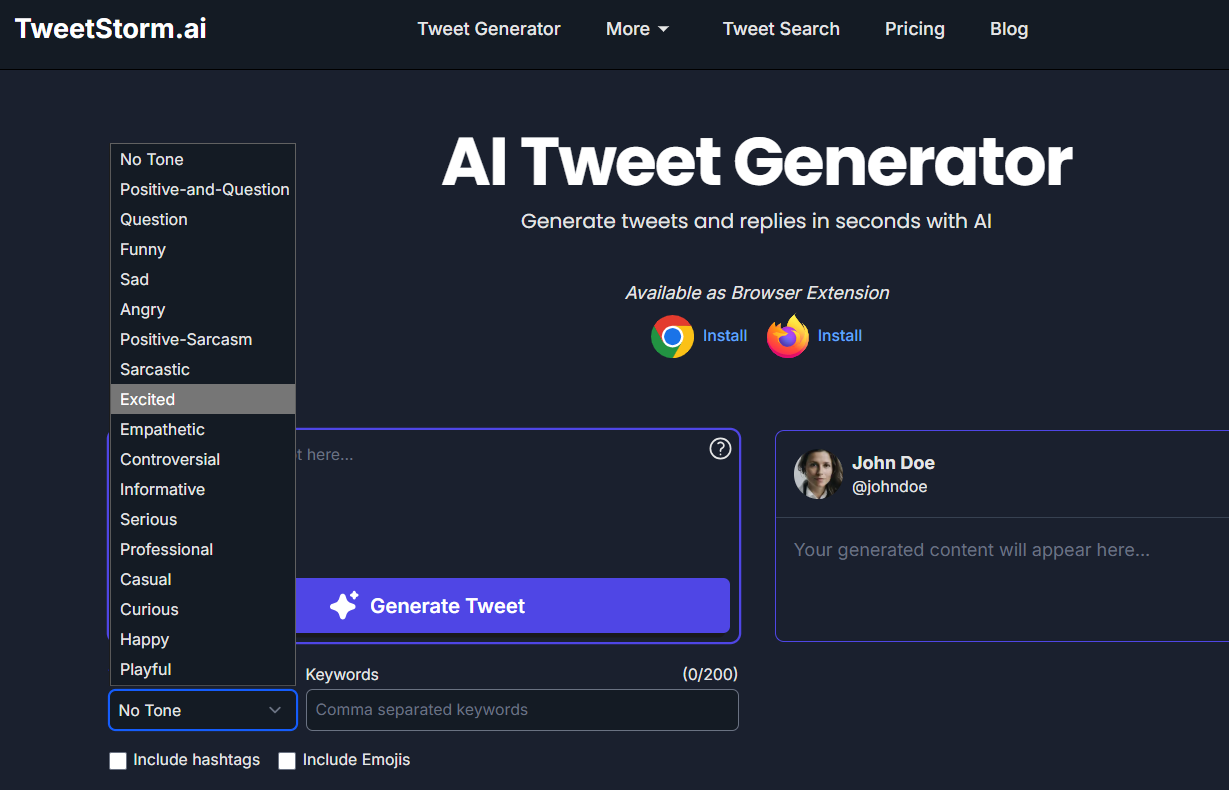
While these 12 formulas provide the strategic foundation for driving blog traffic, successfully implementing them often requires time, creativity and constant experimentation.
This is where an AI tweet generator, like the one offered by TweetStormAI, becomes an invaluable tool for blog promotion.
TweetStormAI can help you apply these traffic-driving formulas quickly and effectively by:
Formula | How can TweetStormAI help? |
|---|---|
1. Employ brief, intriguing tweets | Generate five concise tweets (under 10 words) for your blog post's core message. |
2. Use an intriguing quote | The AI can quickly distill a long quote/summary into a short, attention-grabbing tweet, adapting the tone as needed. |
3. Incorporate statistics | Use AI with a key statistic to create a compelling "Did you know?" tweet with relevant emojis, making the data pop. |
4. Utilize hashtags | The AI suggests theme-specific, general and trending hashtags based on your content's keywords to boost reach. |
5. Pose a topic-relevant question | Use the AI to convert your blog title into a curiosity-generating, relevant question with an engaging tone (e.g., Playful or Serious). |
By leveraging TweetStormAI's features, like customizable tone, targeted keywords and automatic hashtag and emoji suggestions, you can generate high-performing, formula-driven tweets in seconds, ensuring your blog promotion strategy is both creative and efficient.
Final thoughts
Getting steady blog traffic from X or Twitter takes more than simply posting links. It calls for a strategy with several layers. Those 12 key formulas cover short quotes, stats, images and well-chosen hashtags. They provide a clear path to turn casual followers into engaged readers.
The main problem lies in regularly posting diverse and effective tweets tied to each blog article. Tools such as TweetStormAI handle this task by using established patterns automatically. When you blend these methods with AI support, your blog material spreads to more readers, boosts click rates significantly and maintains steady visitor flow over time.
Achieving results on X or Twitter demands reliable tools that enable you to reuse a proven approach time and again.
FAQs
Why is promoting my blog on X/Twitter important?
Promoting your blog on X or Twitter really matters a lot. It links you up with potential customers and fresh readers scattered across more than 500 million users there. Just putting out strong content on its own won't get the job done. You need to promote it actively so that people actually come across what you create.
Do I always have to use my blog post's title in the tweet?
No. Go for creative and really short tweets that spark some curiosity. A quick intriguing tweet, an inside quote or even a question often works better than the posts title alone when pulling in traffic.
How can I make my tweets stand out in a follower's timeline?
Bring in numbers and characters where it fits. Pull from statistics in your article for example. Or add visually striking elements. Think cool relevant images. And include visual calls to action.
Why should I use @mentions in my blog promotion tweets?
@mentions help bring in more traffic to your posts. They do this by possibly getting a retweet from the person or group you tag. That could include big influencers, the original poster or even folks who commented and feel thankful. When they share it with their followers, your content reaches way more people.
Where is a good, permanent place to feature my blog link on my X/Twitter profile?
Your Twitter bio stays the same over time. It makes for an ideal place to add things. Put a clickable link right there to your blog. Or link to one specific post that really matters. Do the same in your about section. Or in the contact area. Add a call to action along with it. That will draw people in to click.
Newsletter
Never miss a post
One email a week with everything new on the TweetStorm blog.