Twitter (X) Advanced Search
Fill in the filters you need, from date range and account to minimum likes and media type, and we build the X search query for you. Free, no account required.
Advanced Tweet Search
What it is
Twitter advanced search lets you narrow a search by words, account, date range, engagement, language and media type instead of scrolling a keyword feed. This Twitter search tool gives you all 23 filters as form fields, writes the X search syntax for you, and opens the results on X. It is free, and you do not need an account to use it.
- 23
- filters in one form
- $0
- no signup, no card
- 71
- languages supported
The form
What each filter group does
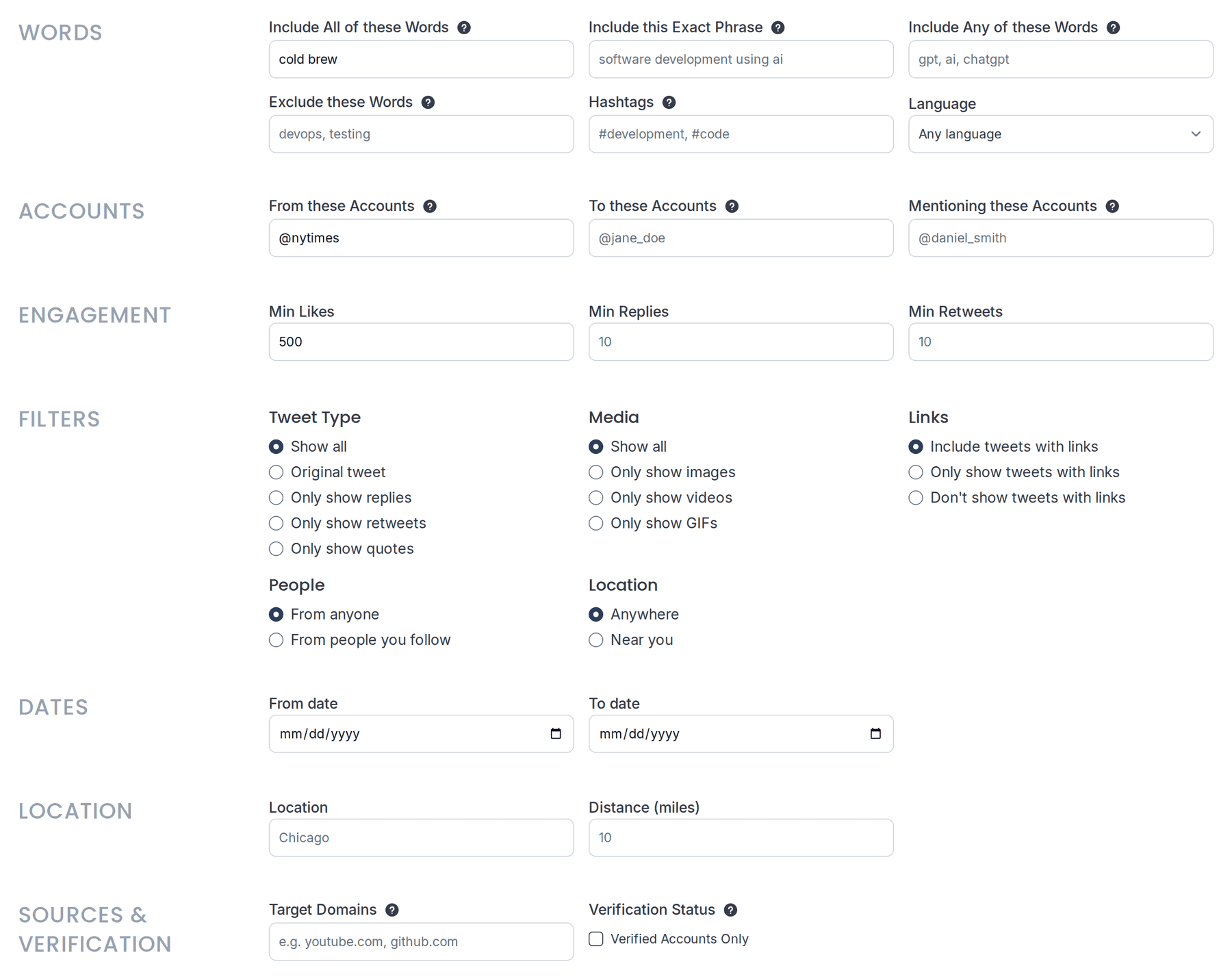
Seven groups of Twitter search filters, working left to right down the form. Pick only the ones you need. Every field is optional, and an empty field is simply left out of the search.
Words
Match all of several words, an exact phrase, any of a list, or exclude terms outright. Hashtags get their own field.
cold brew -decaf
Accounts
Search posts from an account, posts sent to it, or posts that mention it. Handles work with or without the @.
from:nytimes
Engagement
Set a floor for likes, replies or reposts. Useful for skipping the long tail and finding what actually landed.
min_faves:500
Filters
Narrow by post type (original, reply, repost or quote), by media (images or video), and by whether posts carry links.
filter:images -filter:links
Dates
Pick a start date, an end date, or both. X's index reaches back to its earliest public posts, though it does not hold every post ever made.
since:2026-01-01 until:2026-06-30
Location
Narrow to posts near a place, or near you, within a distance you set.
near:"San Francisco" within:15mi
Sources and verification
Limit results to posts linking a specific domain, or to verified accounts only. Both are useful when you are tracing where a claim came from.
url:nytimes.com filter:verified
Common job
Search one account's posts for a keyword
This is the Twitter keyword search people are actually trying to run, and the one X makes hardest. Two fields do it: put the handle in From these Accounts, put the term in Include All of these Words.
- 01
In From these Accounts, enter the handle. One per search.
- 02
In Include All of these Words, enter the term you want inside their posts.
- 03
Add a date range if you only want a certain period, then search.
What that runs on X
(from:nytimes) climate since:2026-01-01
Point it at your own handle and it works as a tweet finder for your old posts, or use it on an account you are researching to see everything they have said on a topic.
Reference
Every filter and the X search operator it writes
X supports far more search syntax than its own advanced search form exposes. This table maps every field in the form to the Twitter search operators it writes, so you can read the query it builds or type them yourself.
Words
- Include All of these Words
term1 term2- Include this Exact Phrase
"exact phrase"- Include Any of these Words
(one OR two)- Exclude these Words
-term- Hashtags
(#tag)- Language
lang:en
Accounts
- From these Accounts
(from:handle)- To these Accounts
(to:handle)- Mentioning these Accounts
(@handle)
Engagement
- Min Likes
min_faves:10- Min Replies
min_replies:2- Min Retweets
min_retweets:3
Filters
- Tweet Type: Original tweet
-filter:replies -filter:retweets -filter:quote- Tweet Type: Only show replies
filter:replies- Tweet Type: Only show retweets
filter:retweets- Tweet Type: Only show quotes
filter:quote- Media: Only show images
filter:images- Media: Only show videos
filter:videos- Media: Only show GIFs
filter:gifs- Links: Only show posts with links
filter:links- Links: Don't show posts with links
-filter:links
Dates
- From date / To date
since:2026-01-01 until:2026-06-30
Location
- Location
near:"San Francisco"- Distance (miles)
within:15mi
Sources and verification
- Target Domains
url:example.com- Verified Accounts Only
filter:verified
Combine as many as you like. The form handles the quoting, the brackets and the minus signs, which is where hand-typed queries usually break.
Recipes
Searches worth saving
These are the combinations worth setting up once. On a paid plan, Save keeps the filter set, so you are not rebuilding it next week.
Brand mentions nobody tagged
Catches people talking about you without the @ or the hashtag.
Include Any of these Words: your brand and its common misspellings. Exclude these Words: your own handle.
Posts that actually landed
Skips the long tail so you can see what resonated on a topic.
Include All of these Words: your topic. Min Likes: 500.
Questions people are asking
Finds people asking about your category, so you can be the one who answers.
Include Any of these Words: your category terms. Include All of these Words: how, best, recommend.
What one account said about a topic
Everything a single account has posted on a subject, in one search.
From these Accounts: the handle. Include All of these Words: the topic.
An event, as it happened
Pins a search to the window an event occurred in, rather than what ranks today.
Include this Exact Phrase: the event name. From date and To date: the window.
Verified sources only
Narrows to verified accounts and a specific publication's links when you are tracing a claim.
Verified Accounts Only: on. Target Domains: the publication's domain.
Saved searches
Keep your searches
Run a search and it is gone when you close the tab. On a paid plan, Save keeps the filter set and your search history for next time. Running searches stays free and unlimited on every plan.
See plansCreate a free accountBefore you start
Do you need an X account?
To build the search, no
The form is free and open. Set your filters and hit search without signing in to anything, and without a credit card.
To see the results, yes
X requires you to be signed in to view search results. If you are not, X will ask you to sign in and then run your search for you.
Your filters are not lost in between. X carries the search through the sign-in and lands you on the results.
On your phone
Advanced Twitter search on mobile
X's mobile apps have no advanced search form. Open this page in your phone's browser, set the filters, and search from there.
- The form works the same on a phone as on a desktop.
- Results open in X, in the app if you have it installed.
Comparison
How this compares to X's own advanced search
X can run almost all of these searches. The difference is that half of the rows below are syntax you have to know, because its own advanced search form does not offer them.
- On X
- Yes
- Here
- Yes
- On X
- Yes
- Here
- Yes
- On X
- Yes
- Here
- Yes
- On X
- Yes
- Here
- Yes
- On X
- Operator only
- Here
- A field
- On X
- Replies only
- Here
- A field
- On X
- Operator only
- Here
- A field
- On X
- Operator only
- Here
- A field
- On X
- Operator only
- Here
- A field
- On X
- Operator only
- Here
- In the dropdown
Words, phrase, exclusions, hashtags
Accounts, from, to, mentions
Minimum likes, replies, reposts
Date range
Images or video only
Original, reply, repost or quote
Exclude posts with links
Posts linking a specific domain
Verified accounts only
Languages beyond its dropdown
Nothing here is a trick X cannot do. It is the same search, without needing to remember that -filter:links is how you drop posts with links in them.
Limits
What this tool cannot do
Worth knowing before you spend time on a search that cannot work.
It does not show results on this page.
Searches open on X, which is where the posts live.
It cannot reach private or deleted posts.
If an account is protected or a post is gone, no search finds it.
It does not cover every post ever made.
X's search index is not a complete archive, so old and low-engagement posts can be missing even with the right filters.
It does not monitor or alert.
A saved search is a filter set you re-run, not a watch that notifies you.
Questions
Twitter advanced search FAQ
since: and until: operators, and the form writes both for you. Pair it with an account or a keyword to narrow further, and see our guide to finding old tweets with advanced search.filter:images and filter:videos operators; here it is a radio button. To keep a clip you find that way, the X video downloader saves it as an MP4.More tools
More ways to work on X
Automate, clean up, and grow your X account with the rest of the TweetStorm toolkit.
X Video Downloader
Download videos from X (Twitter) with one link paste.
AI Hashtag Generator
Generate relevant hashtags to get more Twitter engagement.
AI Twitter Username Generator
Generate relevant Twitter handles based on a description.
AI Twitter Bio Generator
Write a Twitter bio from a short description.
Build the search, keep the search
Set your filters, run it on X, and sign in when you want to keep the ones you will use again.